
The fastest way to find someone’s TikTok account by phone number is to run a reverse phone lookup through Searqle. Enter the number, and Searqle searches public sources to return an identity report that includes linked social media profiles — TikTok among them. No username needed, no contact sync required.
TikTok also has a built-in contacts feature that can surface accounts linked to saved numbers, but it only works when the account owner has enabled contact discovery in their privacy settings. For most searches, it returns nothing. The lookup approach works regardless of the other person’s settings.
Here’s how to use both methods.
Method 1: Searqle’s Reverse Phone Lookup (Works Without TikTok Access)
When you have a phone number but no username, a reverse phone lookup is the most reliable route to finding the associated TikTok profile.
Searqle is built for exactly this situation. You enter a phone number, and the platform searches publicly available data to compile an identity report. That report includes social media accounts linked to the person’s identity — including TikTok, if one is publicly associated.
The process takes three steps:
- Go to Searqle and enter the phone number in the search field.
- Searqle scans public data sources and generates a full identity report.
- Open the report and check the social media section for a linked TikTok profile.
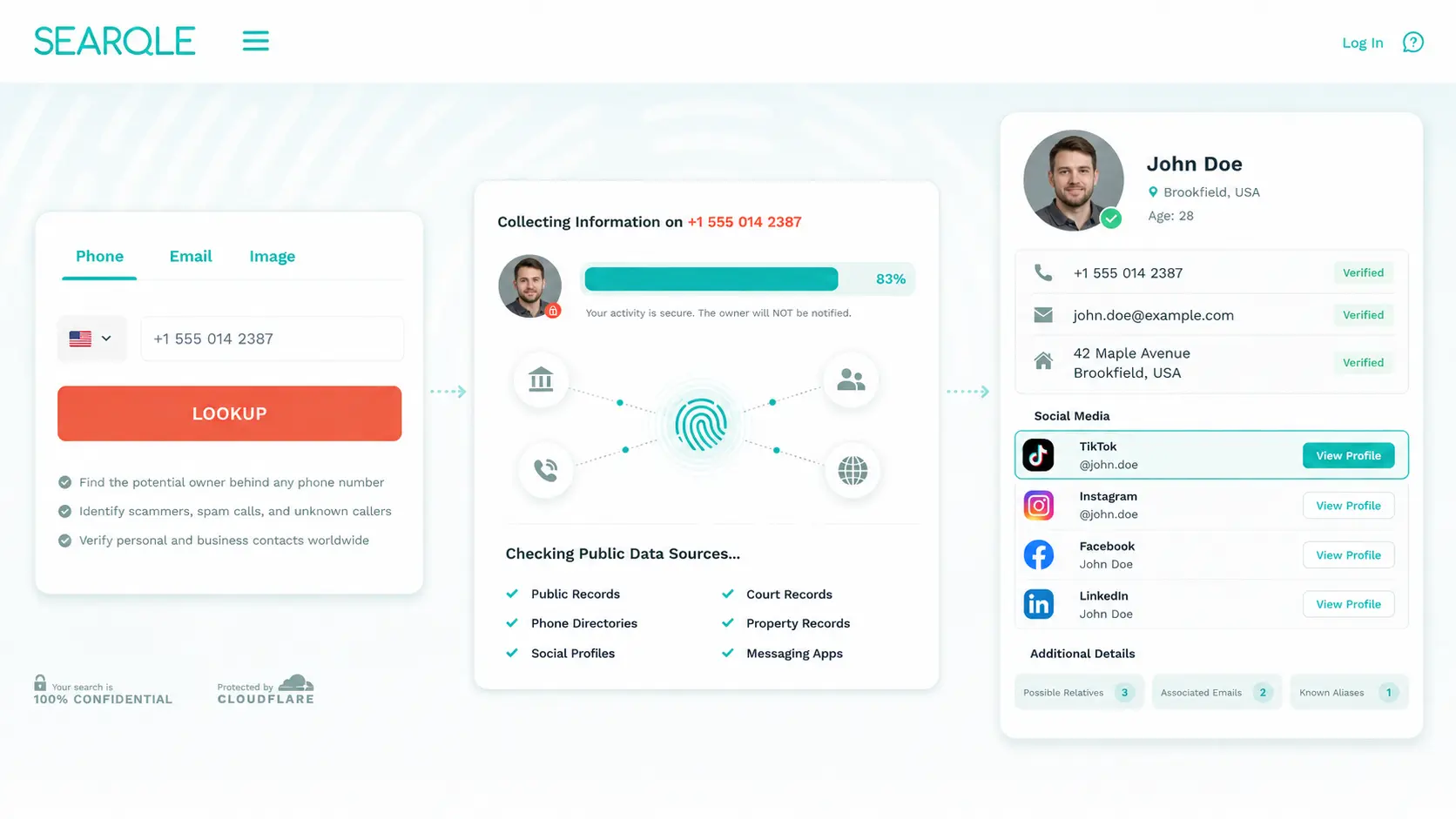
The report also returns the person’s full name, known aliases, current and previous addresses, relatives, employer history, other active social profiles, and data breach exposure records. This matters when the TikTok account alone doesn’t confirm who you’re looking at — cross-referencing name, location, and other profiles gives a complete picture.
This method works whether or not the target account has TikTok’s contact sync enabled, and it doesn’t require you to have their number saved in your phone.
Method 2: TikTok’s Built-In “Find Contacts” Feature
TikTok includes a native contacts sync feature that can match saved phone numbers to TikTok accounts. It’s worth trying first if the person is already in your contacts — but it fails more often than not.
Here’s how to use it:
- Open TikTok and tap the Profile icon in the bottom right.
- Tap the person-add icon at the top right to open “Find Friends.”
- Select “Find contacts” and grant permission to access your contacts.
- TikTok scans your saved numbers and displays any accounts linked to them.

The method only works when two conditions are both true: you have the number saved in your phone, and the account owner has enabled “Suggest your account to contacts” in their privacy settings. This toggle is off by default for accounts created after mid-2021. If it’s off on their end, TikTok returns no results regardless of whether the number matches.
Can You Find Someone on TikTok Directly by Phone Number?
TikTok has no public search that accepts a phone number as input. The contacts sync feature is the only native mechanism, and its success depends entirely on the other person’s privacy settings.
TikTok’s “Suggest your account to contacts” toggle sits under Settings > Privacy > Discoverability. When it’s off — which is the default for most current accounts — no contacts-based discovery works. The account simply doesn’t surface.
Does TikTok notify someone if you searched for them by phone number? No. TikTok does not alert users when someone syncs contacts or runs a discovery attempt.
How to Find TikTok Without a Username
When you don’t have a username and the contacts method fails, three approaches remain:
- Full name search: If the phone lookup returns a full name, search TikTok’s search bar directly. Works when the account uses a real name rather than a handle.
- Email lookup: Searqle also accepts email addresses as a search input and returns the owner’s full name, phone numbers and addresses, which you can then use to locate their TikTok.
- Photo search: Searqle supports photo-based lookup that finds where the image appears online, including social media and dating profiles — useful when you have an image of the person but no other identifying details.
Running these in sequence through one tool is faster than switching between services. A phone search that returns a name opens TikTok’s name search. A name search that fails points toward an email or photo lookup. Searqle handles all three input types in the same platform.
Comparing Tools to Find Someone’s TikTok by Phone Number
| Feature / Criteria | Searqle | SocialCatFish | BeenVerified | Spokeo |
| Phone number lookup | Yes | Yes | Yes | Yes |
| Social media profile discovery | Yes | Yes | Limited | Limited |
| TikTok profile included in results | Yes | Yes | Not available | Not available |
| Email address lookup | Yes | Yes | Yes | Yes |
| Photo / image search | Yes | Yes | Not available | Not available |
| No account required to search | Yes | Yes | Yes | Yes |
When the goal is finding a TikTok account from a phone number, Searqle and SocialCatFish both return social profile data. Searqle’s advantage is that phone, email, and photo lookup are combined in one search flow. When a phone number alone doesn’t return a TikTok link, you can immediately run a photo or email search without switching tools — no repeated sign-ups, no separate reports.
What Information Can You Find Once You Locate the Account
A phone number search that returns a TikTok profile typically surfaces more than just the account link. A Searqle report includes:
- Full name and known aliases
- Current and previous addresses
- Family members and known associates
- Employer and job history
- Other active social profiles (Instagram, Facebook, LinkedIn)
- Data breach exposure records
- Associated phone numbers and contact history
This is useful when you need to confirm identity, not just locate a profile. A TikTok account name tells you little on its own — the surrounding data confirms whether it’s the right person.
Tips for Finding Someone on TikTok When Other Methods Fail
When a phone search returns a name but TikTok shows multiple accounts with no clear match:
- Add location context: Check the report for a city, then manually scan matching TikTok bios for location mentions.
- Cross-reference other platforms: If the person has a visible Instagram or Facebook profile, their TikTok username is often listed there.
- Use a profile photo: Download a public image from another social profile and run a photo lookup through Searqle to confirm the TikTok account matches.
- Try username variations: Most people keep usernames consistent across platforms. If a Facebook handle is visible, test it directly in TikTok search.
- Check mutual connections: If the person follows someone you know on TikTok, their account may appear in that mutual’s following list.
Related Guides You Might Find Useful
- How to Find Someone on Twitter (X) Without a Username — 6 methods that actually work when you don’t have someone’s handle, including searching by phone number, email, and Google.
- How to Find Someone’s Snapchat — covers the top options for running a Snapchat username search and finding exactly who you’re looking for.
- How to Search Instagram by Phone Number — three quick methods for looking up an Instagram account when all you have is a phone number.
- How to Find Someone on OnlyFans — 5 methods for locating an OnlyFans profile by phone number, email, photo, or location.
- How to Find Someone’s Tinder Profile — 5 proven ways to search for a Tinder profile, from reverse image search to phone number lookup.
Find the TikTok Account Behind Any Phone Number
TikTok’s contacts feature works only when both sides have opted in. For every other situation — unknown callers, unverified contacts, people you’ve met online — a reverse phone lookup is the practical path.
Run the number through Searqle and the report comes back with the full identity picture: name, addresses, social profiles, and any linked TikTok account. One search, no username required.


